
Codedication Schema Blocks
Structured data for WordPress, built into Gutenberg.
Start free with FAQ, Review, Website, Organization, Person, and Breadcrumb schema. Upgrade to Pro when you need recipes, products, events, local business data, HowTo guides, advanced identity fields, and optional Validgraph validation.
One plugin family, two levels
- Free: essential content and site schema blocks.
- Pro: richer schema types for commercial and editorial sites.
- Native Gutenberg editing, no JSON-LD hand-coding.
- Valid markup improves eligibility; search engines decide display.
For editors
Add schema while writing the page. FAQ items, reviews, product details, recipes, events, and local business fields live where the content lives.
For site owners
Centralize global identity, Website schema, breadcrumbs, and default structured data settings without custom snippets or template edits.
For SEO teams
Use focused schema blocks alongside your SEO plugin, avoid duplicate markup, and validate output with external tools or Validgraph.
Free plugin
The essential schema toolkit for WordPress content.
Install the free plugin to add common structured data blocks and global schema settings directly from Gutenberg and the Schema Blocks panel.
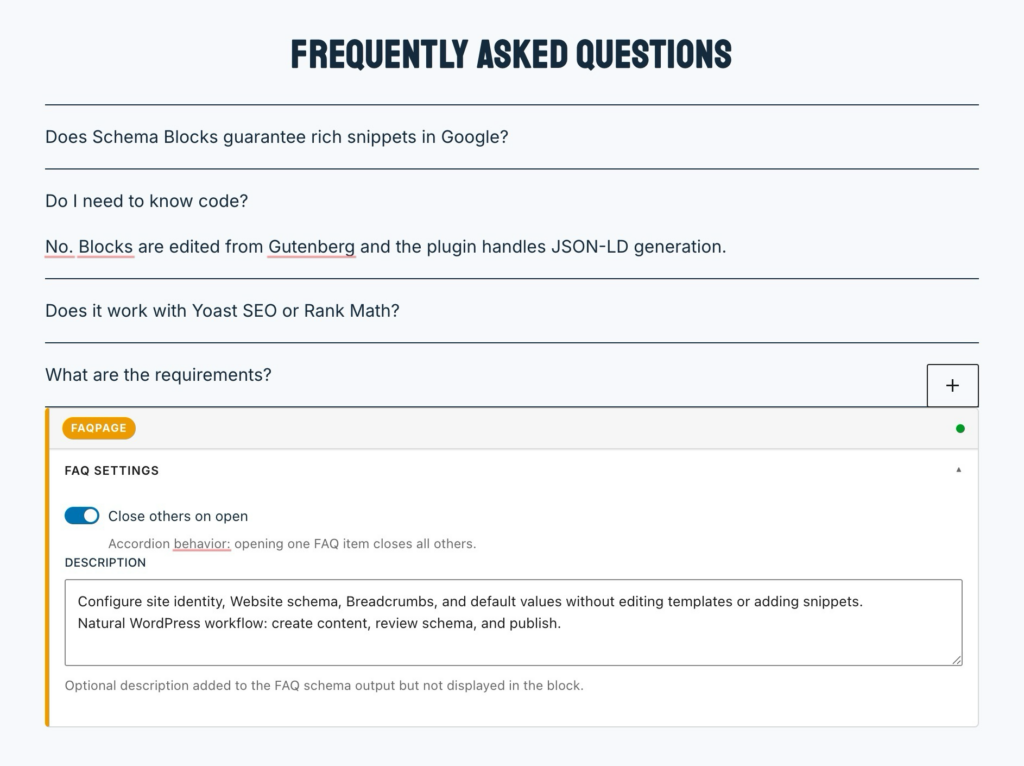
FAQ Schema
Create FAQ sections with FAQPage, Question, and Answer markup directly in Gutenberg.
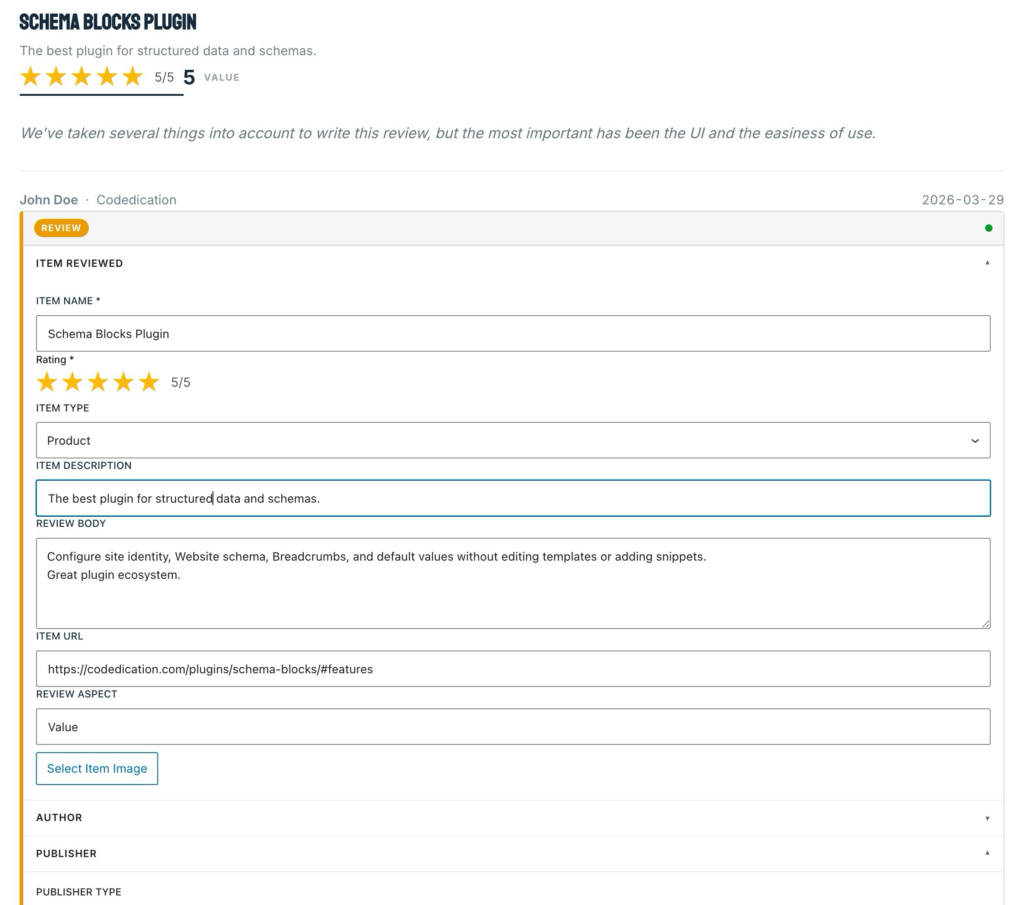
Review Schema
Publish reviews with stars, reviewed item details, author, publisher, date, pros, cons, and review body.
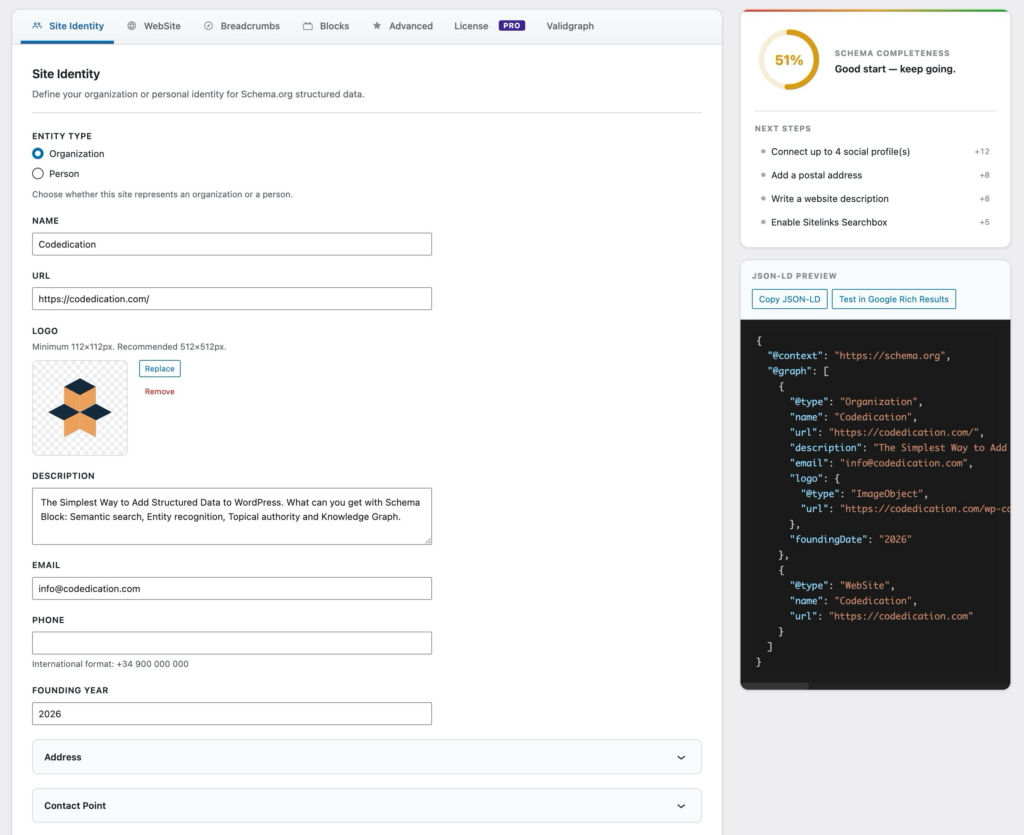
Global schema settings
Configure Organization, Person, Website, BreadcrumbList, JSON-LD preview, and site-level defaults from one panel.
Pro add-on
Upgrade when your content needs deeper structured data.
Schema Blocks Pro adds commercial, local, editorial, and validation workflows while keeping the same native WordPress editing model.
- Recipe with ingredients, instructions, timing, yield, cuisine, author, keywords, and nutrition.
- Product with identifiers, brand, offers, price, currency, availability, URL, and ratings.
- Event with dates, status, attendance mode, location, organizer, and ticket offers.
- Local Business with subtypes, address, logo, contact data, geo-coordinates, hours, and ratings.
- HowTo with steps, supplies, tools, total time, estimated cost, descriptions, and images.
- Breadcrumb block for manual BreadcrumbList schema and clear page hierarchy.
Pro adds validation feedback and stronger entity signals.
Connect Validgraph for advisory scoring, issue lists, pre-publish summaries, and optional post-publish URL validation. Extend Organization and Person schema with knowledge graph links, legal fields, credentials, expertise topics, and professional profiles.
- Completeness score and issue list in the editor sidebar.
- Per-block indicators for supported Pro blocks.
- Server-side proxy keeps the Validgraph API key out of the browser.
- Advanced identity fields for Organization and Person schema.
- Pro block controls, license management, and conflict detection.
Choose the level that matches your schema workload.
Free covers common content schema. Pro adds the structured data types and workflow controls needed by richer sites.
| Capability | Free | Pro |
|---|---|---|
| FAQ and Review blocks | Included | Included through the free dependency |
| Website, Organization, Person, Breadcrumb settings | Included | Extended with advanced identity fields |
| Recipe, Product, Event, Local Business, HowTo, Breadcrumb blocks | Not included | Included |
| Validgraph validation workflow | Not included | Optional connection |
| Pro block toggles, license tab, conflict detection | Not included | Included |
From content to JSON-LD in a natural publishing flow.
1. Insert a schema block
Pick the content type from the block inserter: FAQ, Review, Recipe, Product, Event, Local Business, HowTo, or Breadcrumb.
2. Fill the fields
Editors work with structured controls for answers, ratings, timings, identifiers, prices, locations, credentials, and more.
3. Publish and validate
The plugin outputs JSON-LD. Validate with the Google Rich Results Test, Schema.org Validator, or Validgraph when connected.
Show the product with real Schema Blocks.
The page can demonstrate the plugin using its own blocks. This FAQ section is a real Schema FAQ block, and the review below is a real Schema Review block.
What is Codedication Schema Blocks for?
Codedication Schema Blocks helps you add structured data to WordPress content using Gutenberg blocks and settings panels so editors can work with clear fields instead of writing JSON-LD by hand.
Who should use the free plugin?
The free plugin is a strong fit for sites that need essential schema coverage: FAQ sections, reviews, Website schema, Organization or Person identity, and breadcrumb data from a familiar WordPress workflow.
When is it recommended to upgrade to Pro?
Pro is designed for richer publishing and commercial use cases: recipes, products, events, local businesses, HowTo guides, advanced identity signals, block controls, conflict detection, and optional Validgraph validation.
Do editors need to understand Schema.org or JSON-LD?
Editors can work directly in Gutenberg. The plugin exposes practical fields for questions, answers, ratings, products, recipes, locations, events, and identity data, then generates the structured output for the page.
Can Schema Blocks improve rich result eligibility?
Schema Blocks helps you publish structured data in formats search engines understand. Rich result display is ultimately decided by search engines, but clean and complete markup is the right foundation.
Does it work with SEO plugins?
Yes. Schema Blocks focuses on content-level and site-level schema and can sit alongside tools such as Yoast SEO, Rank Math, All-in-One SEO, and The SEO Framework. For the cleanest output, avoid generating the same schema type twice on the same page.
What does ValidGraph add for Pro users?
ValidGraph gives Pro users validation feedback inside the publishing workflow, including a completeness score, issue lists, pre-publish summaries, and optional post-publish URL checks.
Can agencies use it across different client sites?
Yes. The free plugin covers common schema needs, while Pro adds controls and schema types that are useful across client sites, such as local businesses, product pages, event listings, recipe sites, and expert content.
What are the technical requirements?
The plugin family is built for modern WordPress installations. The free plugin requires WordPress 6.5 or higher and PHP 8.0 or higher, and Pro also requires the free plugin plus an active Pro license.
Schema Blocks keeps structured data close to the editing experience and makes common schema types easier to maintain in WordPress.
Pros
- Gutenberg native.
- Clear schema fields.
- Free and Pro growth path.
Cons
- Rich results are controlled by search engines.
Designed to sit beside your SEO stack.
Schema Blocks focuses on content-level and site-level structured data. It can coexist with SEO plugins such as Yoast SEO, Rank Math, All in One SEO, and The SEO Framework. If another plugin emits the same schema type on a page, disable the duplicate to keep signals clean.
Turn WordPress content into structured data your team can manage.
Install the free plugin for essential schema blocks. Add Pro when your site needs richer schema types, advanced identity signals, and validation feedback.